Buy på.eu ?
We are moving the project
på.eu .
Are you interested in purchasing the domain
på.eu ?
domain@kv-gmbh.de · 0541-91531010
Buy på.eu ?
What limitations does the Nordic keyboard layout have?
The Nordic keyboard layout has limitations in terms of accommodating special characters and symbols used in languages other than the Nordic languages. It may not have easy access to characters used in languages such as Spanish, French, or German. Additionally, it may not be optimized for programming or coding, as it may lack easy access to certain programming symbols and shortcuts commonly used in coding. Finally, the layout may not be as familiar or intuitive for users who are accustomed to other keyboard layouts, which can make it challenging to use in international or multilingual settings. **
How do I find Scandinavian characters on my keyboard?
To find Scandinavian characters on your keyboard, you can use the following shortcuts: 1. For å, ø, and æ: - On Windows: Press and hold the Alt key, then type 134 for å, 155 for ø, and 145 for æ using the numeric keypad. - On Mac: Press and hold the Option key, then type the letter a for å, o for ø, and ' for æ. 2. For ö and ä: - On Windows: Press and hold the Alt key, then type 148 for ö and 132 for ä using the numeric keypad. - On Mac: Press and hold the Option key, then type u followed by the letter o for ö, and u followed by the letter a for ä. These shortcuts should help you easily type Scandinavian characters on your keyboard. **


Similar search terms for Keyboard
Top-Angebote
Products related to Keyboard:
-
HP USB SmartCard Keyboard – UK Layout (QWERTY) – Wired Security KeyboardOverview The HP USB SmartCard Keyboard combines comfortable typing with advanced smart card security, making it the ideal solution for professional, government, and enterprise users. Designed in a UK QWERTY layout, this full-sized wired keyboard offers seamless integration with HP and third-party systems that require two-factor authentication, identity protection, or secure logins—ensuring your data stays safe without compromising on productivity. Key Features Integrated Smart Card Reader – Supports secure logins, access control, and authentication UK QWERTY Layout – Full-size keyboard with number pad for efficient data entry USB Wired Connection – Reliable, plug-and-play connectivity without the need for drivers Government-Grade Security – Ideal for agencies and enterprises requiring CAC, PIV, or other smart card access Ergonomic Design – Quiet keys with a low-profile layout for comfortable long-term use Compatible with Windows & SmartCard Middleware – Works with most enterprise security applications HP Business-Class Reliability – Built with quality materials for heavy-duty office use Long USB Cable – Flexible placement for desktop setups Benefits The HP USB SmartCard Keyboard enables users to implement secure two-factor authentication through the integrated card reader—helping reduce fraud, enforce access control, and meet compliance standards. Ideal for businesses handling sensitive data, healthcare professionals, IT administrators, and financial services, this keyboard protects both login credentials and transmitted data, while maintaining a comfortable and professional typing experience. Specifications Specification Details Model HP USB SmartCard Keyboard Layout UK QWERTY Interface USB-A (Wired) Smart Card Compatibility ISO 7816, CAC, PIV, Java Card, and more Cable Length Approx. 1.8 metres Keys Full-size, low-profile membrane keys OS Compatibility Windows 10/11, Windows Server, ThinPro, Linux Security Protocols Two-factor authentication, secure sign-in Dimensions Approx. 460 x 165 x 30 mm Weight Approx. 900g Colour Black27,94 £*Shipping: 0,00 £Secure redirect to the provider
-
Logitech Wireless Touch Keyboard K400 Wireless Keyboard With Touchpad - BlackDescription The Logitech Wireless Touch Keyboard K400 combines a keyboard with a built-in multi-touch touchpad for convenient control from a distance. It is designed for people who want to control a laptop connected to a TV, including while browsing the web from the couch. Quiet keys with bold, easy-to-read characters support comfortable typing, while the large 3.5-inch touchpad provides multi-touch navigation for easier web browsing. The wireless connection offers a range of up to 10 metres, or 33 feet, and uses a tiny Logitech Unifying wireless receiver that plugs into a laptop's USB port. The keyboard works with Windows XP, Windows Vista, Windows 7 and Windows 8, as well as Windows 8 RT. An essential addition for home entertainment setups, TV-connected laptops and convenient wireless web browsing.74,99 £*Shipping: 0,00 £Secure redirect to the provider
-
Handpicked Choices Car Cleaning Gel Slime For Car Interior And Keyboard Dust Removal Car Cleaning Gel Slime For Car Interior And Keyboard Dust RemovalTired of dust and dirt building up in your car vents, keyboard, or dashboard Our Car Cleaning Gel transforms cleaning into a quick, satisfying experience. Designed for anyone who wants a spotless, hygienic space, this magic slime reaches into tiny...29,97 $*Shipping: 0,00 $Secure redirect to the provider
-
Kensington - Wired Keyboard - BlackBrand Kensington Product Dimensions 18.9 x 6.89 x 1.85 cm; 199.58 Grams Item model number 1500109BFR Manufacturer ACCO Brands Series 1500109PN Colour Black Form Factor Standard Power Source USB Operating System Windows 8, Windows 7, Windows 10 Are Batteries Included No Item Weight 200 g12,99 £*Shipping: 0,00 £Secure redirect to the provider


-
'How do I turn on the Microsoft Design Keyboard?'
To turn on the Microsoft Design Keyboard, first, make sure the keyboard is charged or has fresh batteries. Then, locate the power switch on the keyboard. It is usually located on the side or the back of the keyboard. Slide the power switch to the "on" position, and the keyboard should power up and be ready to use. If you are having trouble finding the power switch or turning on the keyboard, refer to the user manual for specific instructions. **
-
Do you prefer interior design or graphic design?
As an AI, I don't have personal preferences. However, both interior design and graphic design are important and have their own unique appeal. Interior design focuses on creating functional and aesthetically pleasing spaces, while graphic design involves creating visual concepts to communicate ideas. Both fields require creativity and attention to detail, and each offers its own set of challenges and opportunities for artistic expression. **
-
Is interior design so difficult?
Interior design can be challenging for some people due to the need to balance aesthetics, functionality, and budget constraints. It requires a good eye for design, knowledge of different styles and trends, and the ability to understand a client's needs and preferences. However, with the right training, experience, and creativity, interior design can be a rewarding and fulfilling career. **
-
What is the difference between interior architecture and interior design?
Interior architecture focuses on the structural and spatial elements of a space, including the layout, flow, and functionality. It involves designing and coordinating the interior structure of a building, such as walls, ceilings, and floors. On the other hand, interior design focuses on the aesthetics and decorative aspects of a space, including furniture, color schemes, and accessories. It involves creating a cohesive and visually appealing environment that reflects the client's needs and style preferences. While interior architecture deals with the physical structure of a space, interior design focuses on the visual and decorative elements. **

What is the best keyboard for a custom keyboard?
The best keyboard for a custom keyboard would be one that offers a high level of customization and compatibility with different keycap sets and switches. Keyboards with hot-swappable switches and programmable keys are ideal for custom builds, as they allow for easy customization and modification. Additionally, a keyboard with a sturdy and well-built frame, such as an aluminum or stainless steel case, would provide a solid foundation for a custom build. Finally, a keyboard with customizable RGB lighting and software support for programming macros and key remapping would offer a high level of personalization for the user. **
What are some interior design tips?
When designing a space, it's important to consider the functionality and flow of the room. Choose a cohesive color palette and stick to it throughout the space to create a sense of unity. Incorporate a variety of textures and materials to add depth and visual interest. Don't forget to personalize the space with meaningful decor items that reflect your personality and style. Lastly, don't be afraid to experiment and have fun with your design choices! **
Top-Angebote
Products related to Keyboard:
-
Lenovo Bluetooth Keyboard 800 Wireless Keyboard - GreyDescription With ambient light charging and no battery required, the Lenovo Bluetooth Keyboard 800 is a self-charging wireless keyboard designed for everyday use wherever you are. It uses dynamic ambient light collection panels and a supercapacitor to gather and store energy, removing the need for traditional batteries, cables or power outlets. Bluetooth 5.1 connectivity supports up to three devices, with quick pairing through Microsoft Swift Pair. The piston switch is spill-proof and provides 2 mm key movement, while each key is designed for a lifecycle of up to 10 million clicks. Its compact light-conversion panels generate power efficiently, including in low-light conditions, and the keyboard uses just 25% of the power of a standard keyboard. When fully charged, it can operate for up to one month, including in complete darkness. An essential addition for users seeking a durable, battery-free keyboard for everyday computing and multi-device use.66,49 £*Shipping: 0,00 £Secure redirect to the provider
-
Daily Deals Depot Compact Keyboard & Car Interior Cleaning Brush Set With Mini Dustpan Compact Keyboard & Car Interior Cleaning Brush Set With Mini DustpanDust and crumbs have a way of showing up in all the hardtoreach places. This compact keyboard cleaning brush and mini dustpan set helps you quickly sweep away messes from keyboards, desks, car interiors, and other small spaces without dragging out...34,97 $*Shipping: 0,00 $Secure redirect to the provider
-
HP USB SmartCard Keyboard – UK Layout (QWERTY) – Wired Security KeyboardOverview The HP USB SmartCard Keyboard combines comfortable typing with advanced smart card security, making it the ideal solution for professional, government, and enterprise users. Designed in a UK QWERTY layout, this full-sized wired keyboard offers seamless integration with HP and third-party systems that require two-factor authentication, identity protection, or secure logins—ensuring your data stays safe without compromising on productivity. Key Features Integrated Smart Card Reader – Supports secure logins, access control, and authentication UK QWERTY Layout – Full-size keyboard with number pad for efficient data entry USB Wired Connection – Reliable, plug-and-play connectivity without the need for drivers Government-Grade Security – Ideal for agencies and enterprises requiring CAC, PIV, or other smart card access Ergonomic Design – Quiet keys with a low-profile layout for comfortable long-term use Compatible with Windows & SmartCard Middleware – Works with most enterprise security applications HP Business-Class Reliability – Built with quality materials for heavy-duty office use Long USB Cable – Flexible placement for desktop setups Benefits The HP USB SmartCard Keyboard enables users to implement secure two-factor authentication through the integrated card reader—helping reduce fraud, enforce access control, and meet compliance standards. Ideal for businesses handling sensitive data, healthcare professionals, IT administrators, and financial services, this keyboard protects both login credentials and transmitted data, while maintaining a comfortable and professional typing experience. Specifications Specification Details Model HP USB SmartCard Keyboard Layout UK QWERTY Interface USB-A (Wired) Smart Card Compatibility ISO 7816, CAC, PIV, Java Card, and more Cable Length Approx. 1.8 metres Keys Full-size, low-profile membrane keys OS Compatibility Windows 10/11, Windows Server, ThinPro, Linux Security Protocols Two-factor authentication, secure sign-in Dimensions Approx. 460 x 165 x 30 mm Weight Approx. 900g Colour Black27,94 £*Shipping: 0,00 £Secure redirect to the provider
-
Logitech Wireless Touch Keyboard K400 Wireless Keyboard With Touchpad - BlackDescription The Logitech Wireless Touch Keyboard K400 combines a keyboard with a built-in multi-touch touchpad for convenient control from a distance. It is designed for people who want to control a laptop connected to a TV, including while browsing the web from the couch. Quiet keys with bold, easy-to-read characters support comfortable typing, while the large 3.5-inch touchpad provides multi-touch navigation for easier web browsing. The wireless connection offers a range of up to 10 metres, or 33 feet, and uses a tiny Logitech Unifying wireless receiver that plugs into a laptop's USB port. The keyboard works with Windows XP, Windows Vista, Windows 7 and Windows 8, as well as Windows 8 RT. An essential addition for home entertainment setups, TV-connected laptops and convenient wireless web browsing.74,99 £*Shipping: 0,00 £Secure redirect to the provider
-
What limitations does the Nordic keyboard layout have?
The Nordic keyboard layout has limitations in terms of accommodating special characters and symbols used in languages other than the Nordic languages. It may not have easy access to characters used in languages such as Spanish, French, or German. Additionally, it may not be optimized for programming or coding, as it may lack easy access to certain programming symbols and shortcuts commonly used in coding. Finally, the layout may not be as familiar or intuitive for users who are accustomed to other keyboard layouts, which can make it challenging to use in international or multilingual settings. **
-
How do I find Scandinavian characters on my keyboard?
To find Scandinavian characters on your keyboard, you can use the following shortcuts: 1. For å, ø, and æ: - On Windows: Press and hold the Alt key, then type 134 for å, 155 for ø, and 145 for æ using the numeric keypad. - On Mac: Press and hold the Option key, then type the letter a for å, o for ø, and ' for æ. 2. For ö and ä: - On Windows: Press and hold the Alt key, then type 148 for ö and 132 for ä using the numeric keypad. - On Mac: Press and hold the Option key, then type u followed by the letter o for ö, and u followed by the letter a for ä. These shortcuts should help you easily type Scandinavian characters on your keyboard. **
-
'How do I turn on the Microsoft Design Keyboard?'
To turn on the Microsoft Design Keyboard, first, make sure the keyboard is charged or has fresh batteries. Then, locate the power switch on the keyboard. It is usually located on the side or the back of the keyboard. Slide the power switch to the "on" position, and the keyboard should power up and be ready to use. If you are having trouble finding the power switch or turning on the keyboard, refer to the user manual for specific instructions. **
-
Do you prefer interior design or graphic design?
As an AI, I don't have personal preferences. However, both interior design and graphic design are important and have their own unique appeal. Interior design focuses on creating functional and aesthetically pleasing spaces, while graphic design involves creating visual concepts to communicate ideas. Both fields require creativity and attention to detail, and each offers its own set of challenges and opportunities for artistic expression. **
Similar search terms for Keyboard
-
Handpicked Choices Car Cleaning Gel Slime For Car Interior And Keyboard Dust Removal Car Cleaning Gel Slime For Car Interior And Keyboard Dust RemovalTired of dust and dirt building up in your car vents, keyboard, or dashboard Our Car Cleaning Gel transforms cleaning into a quick, satisfying experience. Designed for anyone who wants a spotless, hygienic space, this magic slime reaches into tiny...29,97 $*Shipping: 0,00 $Secure redirect to the provider
-
Kensington - Wired Keyboard - BlackBrand Kensington Product Dimensions 18.9 x 6.89 x 1.85 cm; 199.58 Grams Item model number 1500109BFR Manufacturer ACCO Brands Series 1500109PN Colour Black Form Factor Standard Power Source USB Operating System Windows 8, Windows 7, Windows 10 Are Batteries Included No Item Weight 200 g12,99 £*Shipping: 0,00 £Secure redirect to the provider
-
USA Free Shipping Shop DustLift Car Cleaning Gel For Car Interior, Keyboard & Air Vent Dust Remover DustLift Car Cleaning Gel For Car Interior, Keyboard & Air Vent Dust RemoverTransform hardtoclean spaces into spotless surfaces in seconds with this reusable car interior cleaner. Designed for drivers, office workers, and anyone who values a dustfree environment, this soft cleaning gel reaches deep into vents, buttons, cup...29,97 $*Shipping: 0,00 $Secure redirect to the provider
-
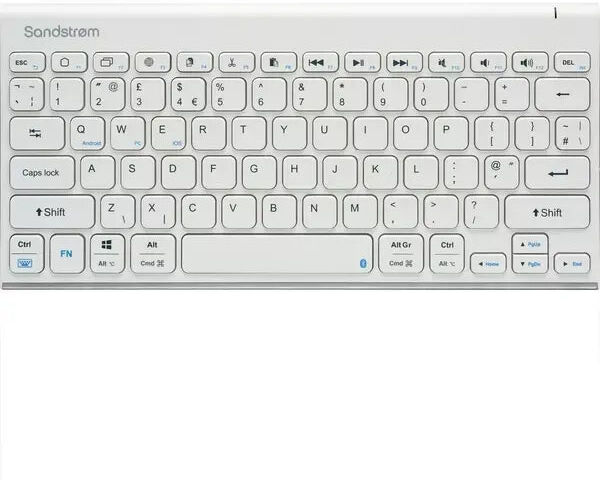
SANDSTROM SKBWHBT25 Wireless Keyboard - WhiteOverview Type with comfort and convenience using the Sandstrom SKBWHBT25 Wireless Keyboard in sleek white — a reliable and user‑friendly accessory for your home or office setup. This wireless keyboard delivers responsive keys, simple Bluetooth connectivity and a slim profile that complements modern workspaces. Whether you’re browsing, working, streaming or studying, the Sandstrom SKBWHBT25 makes typing effortless and clutter‑free. Key Features Wireless Bluetooth Connectivity – Connects easily to laptops, desktops, tablets and other Bluetooth‑enabled devices without cables. Slim, Lightweight Design – Compact and portable keyboard that fits neatly into any workspace or travel bag. White Finish – Elegant colour that matches a range of devices and décor. Comfortable Key Layout – Standard key spacing and tactile feedback for smooth typing. Plug‑and‑Play Setup – Quick pairing with compatible devices for instant use. Extended Battery Life – Efficient power performance for long usage between charges or battery changes. Benefits The Sandstrom SKBWHBT25 Wireless Keyboard improves your everyday typing experience with wireless freedom and a streamlined design. Built for versatility, it pairs effortlessly with smartphones, tablets, laptops and PCs — keeping your desk tidy and your focus uninterrupted. Its lightweight form factor and comfortable keys make it ideal for long typing sessions, whether you’re handling emails, editing documents, or engaging in creative projects. Specification Detail Product Name Sandstrom SKBWHBT25 Wireless Keyboard Connectivity Bluetooth (Wireless) Colour White Design Slim, Lightweight Compatibility Bluetooth‑enabled laptops, tablets & desktops Key Layout Standard Typing Keys Power Source Battery‑powered (typically AA/AAA) Brand Sandstrom39,94 £*Shipping: 0,00 £Secure redirect to the provider
-
Is interior design so difficult?
Interior design can be challenging for some people due to the need to balance aesthetics, functionality, and budget constraints. It requires a good eye for design, knowledge of different styles and trends, and the ability to understand a client's needs and preferences. However, with the right training, experience, and creativity, interior design can be a rewarding and fulfilling career. **
-
What is the difference between interior architecture and interior design?
Interior architecture focuses on the structural and spatial elements of a space, including the layout, flow, and functionality. It involves designing and coordinating the interior structure of a building, such as walls, ceilings, and floors. On the other hand, interior design focuses on the aesthetics and decorative aspects of a space, including furniture, color schemes, and accessories. It involves creating a cohesive and visually appealing environment that reflects the client's needs and style preferences. While interior architecture deals with the physical structure of a space, interior design focuses on the visual and decorative elements. **
-
What is the best keyboard for a custom keyboard?
The best keyboard for a custom keyboard would be one that offers a high level of customization and compatibility with different keycap sets and switches. Keyboards with hot-swappable switches and programmable keys are ideal for custom builds, as they allow for easy customization and modification. Additionally, a keyboard with a sturdy and well-built frame, such as an aluminum or stainless steel case, would provide a solid foundation for a custom build. Finally, a keyboard with customizable RGB lighting and software support for programming macros and key remapping would offer a high level of personalization for the user. **
-
What are some interior design tips?
When designing a space, it's important to consider the functionality and flow of the room. Choose a cohesive color palette and stick to it throughout the space to create a sense of unity. Incorporate a variety of textures and materials to add depth and visual interest. Don't forget to personalize the space with meaningful decor items that reflect your personality and style. Lastly, don't be afraid to experiment and have fun with your design choices! **
* All prices are inclusive of VAT and, if applicable, plus shipping costs. The offer information is based on the details provided by the respective shop and is updated through automated processes. Real-time updates do not occur, so deviations can occur in individual cases. ** Note: Parts of this content were created by AI.